
Blog
How To Fix Your Hacked Website
Hacking used to be something that happened to other people but recently we’ve come into close contact with a couple of hacked websites.
How do you know if your website is hacked?
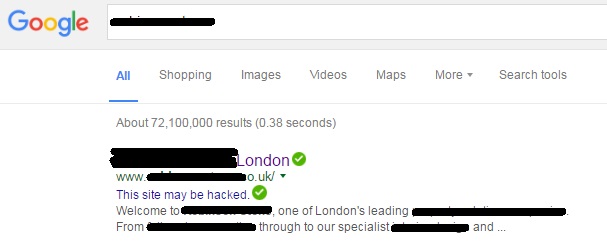
If you come across this message on Google: “This site may be hacked” then chances are your website has been hacked.
What to do if your website is hacked?
-
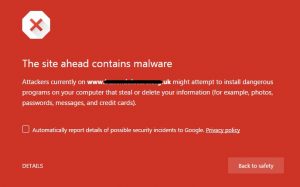
If you don’t act fast or the owners don’t act on your information then you may end up seeing an error message like this
Act fast. No-one wants to visit an unsafe site on the world-wide-web as it may mean that their computer becomes infected too.
- If you are not the website owner, you should inform them. They will need to notify the web designer.
- Check that security software is installed in the website to stop future risk of hacking. We work with WordPress websites, and a simple plug in called Wordfence notifies us when someone has logged in and when plugins need updating (these should be updated regularly for security).
- Make sure you have backups of your website. In WordPress, we use Backup WordPress which automatically runs daily backups of the site. For one client, we download a weekly site backup, however a lot of web designers hold automatic backups on their remote server.
- Change your password
- Log into the Google Search Console and use Fetch to see what the issues are
- Get your site scanned & cleaned of all the hacked content, we use a great company called 3D Pixel who offer a service called Salvage my site. They were able to remove tiny scraps of data and also detect how the hackers gained entry and secure your site.
- Submit a request and review in the Security Issues section in Search Console when your entire website is clean and secure. After Google check that your site is fixed, they’ll remove the “This site may be hacked” message.
Google is not going to rank websites which are unsafe so it is best to get it sorted as soon as possible. Once your site is back up and working you should keep a close eye it to make sure you have properly fixed the issue and the hackers cannot regain access to your site.
Video hosting: Youtube vs Vimeo
 You may have heard that video is one of the best ways to promote yourself online. However, when one of our newest clients asked us whether we could put their 20 minute video on their website as opposed to YouTube, we had to stop and think. We knew that the video would slow the website down so what is the best practice when it comes to websites and videos?
Videos on websites
In short, here are 10 reasons why you shouldn’t host your own videos in a great article by wp101. Not only would it slow the website down, it also may:
- Exceed the file size limit and storage space on your website
- Experience streaming problems (slow loading problems and interrupted playback)
- Require multiple playback formats ie .mp4, .ogv, and .webm
- Require you entering tricky code to get the WordPress video player plugin to work
This rather off putting list just goes on and on…
Luckily there are third party video hosting services out there who are experts in this arena.
How to embed your video on your WordPress website
Once you have realised that letting a third party host your video is a good idea, you will need to embed your video into your post or web page. Simply upload your video to a video hosting service (Youtube or Vimeo are just two), copy the URL into the page or post and then save. When you check the published page or post, you will be able to view the video. It will be streamed from the video host’s server but viewed on your website.
YouTube vs Vimeo
YouTube might be the world’s best known video sharing platform but is it right for your business? What has it going for it? Let’s list the pros:
- It’s owned by Google which means one sign up to a Gmail account or Google+ page will ensure you are signed in
- In a world where money talks, taking advantage of a free video sharing channel for your brand just has to make sense
- You can use Google adwords to promote your videos
However, there are always downsides:
- Not all content on YouTube is quality, so the video after yours might not be as “professional”
- Once your video has finished streaming, they will show you others that “might be of interest” (but we bet they won’t be)
- Some companies ban the viewing of YouTube at work, so you might be missing out on your target audience
Vimeo might be less well-known but there are a lot of pros:
- There are no adverts – so the video you upload is all the viewer sees
- You will need to pay for their service (from $17 per month) but they do say you pay for what you get!
- You are surrounded by higher quality content because if you are paying, you won’t be posting some “funny video” of your mates down the pub
NB
There is a “free” version of Vimeo but it limits you to one HD upload per week with a maximum file size of 500MB
You’ll notice that we aren’t listing the fact that you pay for this service as a con:
- Vimeo receives less web traffic compared to YouTube but things are improving
- There are rumours that Google remove videos not on YouTube from their search results
- The amount of uploads are limited
Which would we choose?
As we work with small businesses on a budget, we would probably suggest YouTube purely for the fact that it is easy to create an account and is free. However, if we had a brand client with a bigger marketing budget, we would probably suggest Vimeo.
Tips about videos on social media
- Keep them short, under 2 minutes, although under 30 seconds long will get you more viewers and shares
- Have subtitles so people can watch then without sound
- Have your contact details at the end of the video so they know where to find out more including watching the full length videos
Talk to us if you want to assistance in linking videos to your website.
No Results Found
The page you requested could not be found. Try refining your search, or use the navigation above to locate the post.