
Blog
How to get the most out of Twitter
These days it’s imperative that you monitor your social media to make sure your content & strategy are working effectively. Most social media platforms such as Facebook come with easily accessible analytics/insights but with Twitter your analytics are not set-up automatically, you need to create an analytics account separately.
Rolled out in the summer of 2014, Twitter analytics allows you to track engagement of your tweets, learn how to tweet more successfully and learn more about your followers.
Here’s how to Sign Up
When you create a new Twitter account, create your analytics account at the same time:
- Search for “twitter analytics” and you should find this URL https://analytics.twitter.com/about
- Sign in with your Twitter login details
- Click the “Turn analytics on” button
- This will start recording your activity straight away
What does the tweet activity dashboard look like?
Here is a screenshot of Red Desk’s twitter activity for February. We like that it clearly shows your top tweet, mention and perhaps most importantly your top follower, but it also shows your tweet impressions, this means how many twitter feeds you have appeared in & therefore how many people have potentially seen your content.
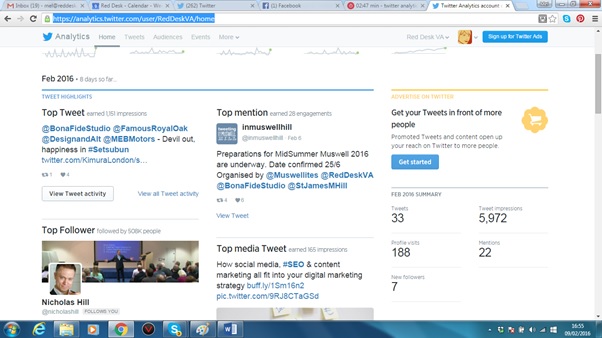
What can I do with this information?
Like other analytics tools out there, you can do as little or as much as you want with this information. Red Desk pick out the key information when running social media engagement reports for clients, including the number of tweet impressions, new followers and what the top tweet was.
It might be worth your while following & interacting with your top follower, they may be able to add clout to your social media campaign.
By analysing the top tweets, you can see what kind of content is working for you & why, chances are it contained good keywords and hashtags.
What else can Twitter analytics do?
Take a look at the follower dashboard. It gives you all sorts of audience insights about their interests and demographics. For example Red Desk’s followers fall into the Business and Finance categories. This is key information so that if we wanted to grow our (or our clients) twitter following then we could look at these categories and treat them as keywords.
How can Red Desk help?
We offer training sessions on all aspects of social media. Whatever your challenge, we can sit down with you for as little as an hour and help you master social media more effectively.
Pinterest Engagement
Since Pinterest created business specific accounts in 2012, it has become a valuable asset for small businesses particularly those in the creative fields.
In 2014 Pinterest was the fastest growing social media platform.
A Pinterest post can be seen for 4 to 5 months after it is initially pinned giving a post on Pinterest a much greater value than something posted to Facebook or Twitter.
So if you haven’t set up your Pinterest yet here are some tips and tricks we have learnt along the way:
The Basics:
- Ensure your business has a business profile rather than a personal one, if you have set up a personal one in error it is easy to convert it to a business account. There are significant difference between them, read more here: http://www.socialmediaexaminer.com/pinterest-guide-business-pages/
- Make sure you confirm your website helping it to appear higher up the search ranks
- Install the Pin it button onto your website so you can easily share imagery when you see it
- Be careful with hashtags – don’t stuff your descriptions with too many as this could affect your ranking
- Follow engaged Pinners that will interact with your pins
Content:
If you write blogs, why not share these on Pinterest
- Write a brief description or quote from your article
- Provide an image and a link to your article
- Search for other images which relate to your blog topic and pin these – you can always rewrite the description to include keywords
The main point of Pinterest is to share images
- Share images from your website
- Share images from your other social media accounts
- Beware of sharing images from Facebook (see tip below on this)
- Remember to add keywords and links back to your website where you can
Engagement
It might be easy to gain lots of followers on twitter but what about Pinterest? You will need to dedicate time to grow your following by interacting with other pinners (as you would on twitter/Facebook for example).
- Make sure you have original and relevant content to pin
- Pin often and regularly (diarise this) so you appear in your followers feeds
- Follow your followers, look at their boards and followers, and don’t forget to repin, like & comment your followers pins
- Have a contest board ie “Pin it to Win it”
- Shareable images with “How tos” and tips do well
- Look for successful people, boards and brands in your area of speciality and follow their followers
 Sharing images from Facebook
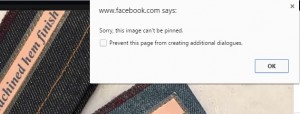
You will find that if you try and pin photos from Facebook that you get an error message
There is a work around this but we would recommend you only do this for photos that you have posted yourself or have the rights to:
- Right click on the image and then select “Open image in a new tab”
- In the new tab you can now Pin it to Pinterest
- Please note you will need to change the URL in the image description to something more relevant like your website address
Other Pinterest tips
- You can schedule pins by using ViralWoot
- Group boards get your content out there – look for boards with over 10,000 followers (and message the owner)
We hope this is enough material to get you started on your own Pinterest boards. We are however around to give you 121 tutorials. Get in touch with lindsay@reddesk.co.uk to find out more.
No Results Found
The page you requested could not be found. Try refining your search, or use the navigation above to locate the post.