
Blog
New Client: Georgia Holleran and The Last Self-Help Book You’ll Ever Need
New Client: Georgia Holleran and The Last Self-Help Book You’ll Ever Need
We’re proud to introduce our new client Georgia Holleran and her book The Last Self-Help Book You’ll Ever Need! During the coming months we’ll be working with Georgia to help her find podcasts guest spots, bookshops where she can talk about her book and events where she can run workshops using the techniques discussed in the book.
Here’s a bit about Georgia:
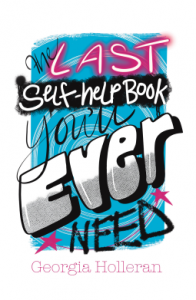 2022 was the toughest year of Georgia Holleran’s life, but she came through it unscathed, strong and even thankful. After 40 years of devouring self-help products and continually searching for answers to her life struggles, but encountering nothing but disappointment, frustration and despair, she suddenly discovered herself to be a pretty capable and confident person.
But she didn’t know why she was so bulletproof. How did she get to be so calm, resilient, resourceful and level-headed, even in crisis? Was it age? Wisdom? Luck? If she had known years back what was going to make this difference in her, could she have got there quicker?
But then it all began to make sense …
Georgia Holleran has spent her life researching how we can make the best of our time on this planet, without letting ourselves get in the way. Her background is in the arts, education, neuro-linguistic programming, cognitive hypnotherapy and a research Masters. This book summarises the best she has learned … so far.
Georgia explains: “Having spent 40 years restlessly searching for the ‘one thing’ I could focus on in my life, it dawned on me, in my 50s, that maybe I should have found it by now. This caused me to notice that my addiction to self-help products was part of the problem: the relentless hope to disappointment to hope cycle is generated by an industry that feeds on insecurity and optimism.
The catalyst came when I spent most of 2022 caring for my dying parents and then sorting out their affairs after their deaths. I noticed that, even though I was experiencing the most trying and emotionally charged year of my life, I was calm, capable and very much in control of the whole situation.
 I examined how I had weathered the emotional storm and noticed I used many techniques that I had been taught and picked up since I was in my late twenties. It’s like they all came together when I needed them. Without me even remembering what to do and how to do it.
My book is my knowledge distilled and explained. As I wrote it, I realised the ONE THING that was missing. It was the key thing that, if not flagged up, renders ALL self-help products ineffective. Needless to say, the self-feeding self-help industry does not flag this up. So I decided to.”
If you want to know more then why not be part of Georgia’s Community. She is actively looking for The First 100 members who want to give her some solid feedback and results using her book: The Last Self-Help Book You’ll Ever Need.
If you would like to her to:
WORK WITH YOU PERSONALLY, to help understand what you’d like to achieve.
TEACH YOU EVERYTHING from The Last Self-Help Book You’ll Ever Need.
CREATE RESOURCES to further clarify anything you want help with.
GUARANTEE you’ll start to see your life and future in a very different way.
Just drop her a line here and let’s chat.
We’re very much looking forward to supporting Georgia with her project. Keep an eye for our Red Desk social media posts with requests and see how you can help us make this book a hit!
Get In Touch
Tips for Generating Content for your Blog and Social Media
Tips for Generating Content for your Blog and Social Media
If you write a regular blog for your website then there might be times when you are stumped for inspiration and content. In this article, we’ve got a few tips for generating content for your blog and social media so you’ll never be lacking ideas again.
Content Calendar
When we work with a new social media client, one of the first things we do is to check for relevant social media awareness days which may include Data Privacy Day (28th January), Random Acts of Kindness Day (17th February) or National Creativity Day (30th May). There are lots of websites out there where you can check. Bulldog Digital Media have done the hard work for you and have created a 2024 downloadable holidays calendar. You can then use these holidays as inspiration for social media posts or even an article (better if this is for an awareness month). You can read more in our dedicated article: https://www.reddesk.co.uk/seasonal-content-marketing/
 Guest Posts
If you have discovered a new supplier that you can’t recommend highly enough or if you are collaborating with another business on a project, why not ask them to write a post for your website? You’ll not only get new content but you’ll be able to spread the word about how great they are. Posts we’ve done in the past include:
https://www.reddesk.co.uk/meet-lucys-web-designs/
https://www.reddesk.co.uk/mms-studio-martina-spence-brand-consultation-conscious-marketing/
You may also find that some organisations might approach you about their product or company. If you think it is a good fit, you can incorporate their article and links into your blog. For example:
https://www.reddesk.co.uk/green-web-hosting/
https://www.reddesk.co.uk/guide-to-web-hosting/
News
Do you write a newsletter? Use this content for website blogs or social media posts.
If you are lucky enough to be shortlisted for an award or mentioned in an article then don’t be shy, shout about it! We’re proud that our blog is featured in the UK’s top 50 Virtual Assistant blogs! https://www.reddesk.co.uk/reddesk-va-blog-feedspot-top-50-uk-virtual-assistant-blogs/
Updating Articles
One of the quickest ways to generate new content is to recycle existing articles. It is always important to carry out a content audit of your website as something you referred to 5 years ago may no longer be relevant or even exist. For example, do you remember Google+? We ran developed and ran Google+ training sessions and naturally wrote several articles about this social media platform. Google has closed it down so we took down articles but included some of the content in other articles.
Networking and Clients
When you come up with a particular challenge for your work and you have to research it, share your experiences and learnings in a blog. If you find yourself with a new type of client or offering a new type of service, share this on your social media.
Repurposing Content
In this article we have mainly spoken about inspiration for writing blog posts. However, make sure you use this content for your social media posts too. Repurpose the content so that you can share your learnings, offers or tips. When our new blog is out, we often create a simple post announcing that we’ve published a new article on our website and provide the link.
Still stuck? Red Desk offer a content writing service so whether it is refresh of your website with updated keywords, improving your social media presence with regular posts or creating newsletters to shout about your latest offers, we’re here for you. Do get in touch by emailing mel@reddesk.co.uk.
Get In Touch

To Be A PA
Red Desk VA and PA Jacqueline Goldenstein is part of Athena Network Group in Muswell Hill. Jacqui knows how to make a memorable pitch. Here is her 1 minute, in the form of a poem "To be a PA": To Be A PA A new day a new client, a fresh challenge, I...

How to get the most out of Twitter
These days it’s imperative that you monitor your social media to make sure your content & strategy are working effectively. Most social media platforms such as Facebook come with easily accessible analytics/insights but with Twitter your analytics are not set-up...

Pinterest Engagement
Since Pinterest created business specific accounts in 2012, it has become a valuable asset for small businesses particularly those in the creative fields. In 2014 Pinterest was the fastest growing social media platform. A Pinterest post can be seen for 4 to 5 months...
How coaching can help small businesses
I recently won a coaching session as a raffle prize. My first instinct was to find someone “who needed it more than I did”, however everyone I approached seemed to be sorted. In the end I contacted the coach and booked my complimentary session. I am a big...
Social Media Training & Social Media Consultancy
Here at Red Desk we attempt to offer a very flexible service as we understand that the support needs of small businesses is ever changing. We therefore offer a variety of services to help small business owners manage their social media and online presence. We can...
Event Planning
One area of organisation that Red Desk are particularly good at, that clients might not know about is Events Management. Our team have varied backgrounds but one thing in common is that we have all organised events in our previous roles. Before setting up Red...
Community Events
Red Desk LOVE organisation. If we aren’t organising our clients, or things on behalf of our clients then we have itchy hands and are looking for other organisational opportunities. We are the VA company who cannot not volunteer. If there is an...
The best social media platforms for creative businesses
If you are a creative business then you will want to communicate with your audience in a visual way about your service or product. Red Desk works with a variety of creative clients so here’s a guide to the essential social media platforms for creative businesses....
Rebranding your Small Business – what to consider
We have recently had experience of a business wanting to change their name & rebrand their business. They wanted a better URL address to improve online search results and a name more relevant to their business. When naming your business it’s wise to try &...
Understanding Social media marketing, SEO and content marketing
You may be familiar with the phrases social media marketing, content marketing and SEO but could you tell the difference? All are part of an online marketing strategy and interlinked but the main differences are: Social Media Marketing Social media marketing is using...